Categories
Uncategorized

Odd Maps

While doing some research for a project, I came across a number of unusual orienteering maps:

“Trog-O” – In an underground warren of caves, in south London. Article, map.

“Metr-O” – Orienteering above – and in – a major underground station in Italy. Article, map.

“Ship-O” – On three levels of a cruise ship, in Turkey. Article, map.

“Urb-O” – Park orienteering using aerial imagery, in Norway. Article, map.

“Canoe-O” – Orienteering on the water, in the USA. Article, map.

…and “Punt-O” – Navigating a punt around an aquatic orienteering course, a few years ago. Pioneered by Oxford. No map available on the internet, but it is out there somewhere…

Categories
Uncategorized

What’s On My iPhone?

iPhone Screenshot

iPhone 3G Good:

  • A lot of very nice, free apps – the Facebook and Bloomberg apps are particularly impressive. Apple’s Remote app is superb.
  • Generally a very responsive OS and the screen looks fantastic.
  • The GPS seems to get a fix in tough conditions (e.g. indoors) although there’s no way to know that this is a GPS fix and not just a phonemast/wifi-located signal.
  • Automatic geotagging when photographs are taken means there is going to be an explosion of geotagged images on the web soon.
  • Exposure’s “here are the photos nearest to where you are now” feature is nice.
  • No Flash content – not sure if this is a good or a bad thing, but I think on the whole it’s a good thing.
  • Web browsing with Safari is very good.
  • Lots of intelligent gesture-recognition.
  • The process of adding a contact’s photo, and adding a new application, is extremely straightforward.
  • There’s a WordPress client for the iPhone coming soon – cool!

iPhone 3G Bad:

  • No “decent” GPS app with sat/signal info, waypointing and live updating of directions – yet.
  • The iPhone itself is quite heavy – it feels like a solid block of metal. It’s also going to be a pain to keep the surface clean.
  • No apparent way to get “free” homebrewed applications (e.g. OSM or a simple GIS) onto the iPhone itself, without shelling out for a developer license. I would love to create a simple application for field surveying, for instance.
  • The camera is pretty poor quality – worse than my Nokia N73, which I thought was pretty bad.
  • The Weather app always says “Sunny, 23” on its logo when it’s not open. Actually, it is sunny and 23 outside in London at the moment, but that’s just a coincidence.
  • Likewise, the clock logo doesn’t update.
  • No obvious way to know if an app has received the latest data, or you are viewing old data, on first opening it.
  • No password manager for Safari.
  • Not brilliantly impressive text autocomplete – it should know a few of my internet login IDs by now.
  • Lots of spammy looking apps cluttering up the app store – some QA by Apple would have been good.
  • I can’t assign Facebook pictures of friends to be contact pictures in my address book.
  • It would be nice to have Java J2SE or Python on the phone, but I don’t think Apple’s application rules would ever allow it – they do keep Flash away from the phone too which is good.
Categories
Uncategorized

Sheffield Garmin Ultrasprint

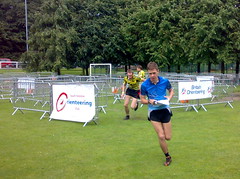
Top Seeds Exit the LabyrinthI caught an early train up to Sheffield yesterday, for the Garmin Ultrasprint, that SYO were organising as part of the “Cliffhanger” outdoor activities festival. The event promised the famous “labyrinth” and I was intrigued to see how I would fare.

The map consisted of two 1:1000 sections, of the labyrinth, which were visited at the start and end of the course. In between, there was a 1:2500 section through the rest of the park – and the various other festival stands.

The qualifiers were started with four runners at a time, completing slightly different courses. I ran my heat in 11:44, missing out on qualifying for the A final by around 70 seconds. I made quite a few mistakes. Most of them were very small mistakes, but every second counts for race of this type. My biggest mistake was getting caught at an out-of-bounds area and having to go round the long way – wasting perhaps 50 seconds. The course was pretty intense – 32 controls in 1.5km.

The B final still had some interest for me, as there was a still a prize for 1st place. Again, four people were started at once. This time, the controls were the same, but four different butterflies, each with two “wings”, separated the runners, on the 2.4km, 46 control course. The central controls of each butterfly were dead, working around the 35 control limit of v5 SI cards, such as my own.

My run, in around 18 minutes, was “steady” but not fast enough – the winner took just over 14 minutes – an impressive time. I didn’t make any big mistakes this time. I was somewhat sluggish on the longer running sections, but there’s no way I could have made up four minutes.

The Ultrasprint is an exciting format – definitely spectator-friendly orienteering. I was thinking on the way back home of possible venues for race that SLOW might be able to put on one day – perhaps in conjunction with a borough council’s outdoor activities show, to get the specators in. My current pipe-dream thinking is Potters Fields Park, by London’s City Hall, with the labyrinth on the grassy area and the long section on the plaza in front of the More London complex.

[Update – My report for Nopesport is here.]

Categories
Uncategorized

Maps and Courses, the Mac Way

I’ve just sent off my first “proper” orienteering map to the printers.

The process was slightly convoluted:

  • Survey done by annotating OS base map and taking photographs. Averaged 3ha per hour.
  • Cartography done in Adobe Illustrator CS3 on Mac OS X. Used my photos, annotations, Google aerial photos and MS Birds Eye (oblique) photos. Averaged about 0.5ha per hour.
  • Rough GIF file of the map created.
  • Course planning done in Purple Pen Beta 2 (running on Windows XP).
  • Leg running-distance calculations done using Quantum GIS 0.10 and some shapefiles of the buildings/streets. This step could be made easier if I georeferenced my GIF raster and used that instead.
  • Exported the courses from Purple Pen as OCAD files.
  • Moved the map file so that OCAD couldn’t find it, so just shows the courses.
  • Bespoke edits, such as numbering changes, in OCAD 9.6 Demo (not saved, but can export)
  • Exported the courses from OCAD in EPS (Encapsulated Postscript) format.
  • Back on the Mac, placed the courses as a layer on top of the map.
  • Saved the whole thing – created a PDF of it as back-up.
  • Sent for printing.
Categories
Uncategorized

QM Race – Map Done

A week until the event. The map is done, now it needs to be edited and corrected!

Here’s a MOO card for the event that I designed, and would have bought to promote it, except it would have taken too long to be delivered 🙁

Hope you like it! I might do one of these for the City Race.

QM race