Categories
OpenStreetMap

Scottish Popular Edition Tracing for OSM

The provision of free-for-any-use spatial data for the UK may be changing dramatically on April 1 with the anticipated release of some Ordnance Survey mid/small-scale mapping and data for unrestricted use.

Until then, the only Ordnance Survey maps that have been able to be used to derive data from for the OpenStreetMap project in its bid to complete coverage in the UK, are those that are more than 50 years old and therefore not protected by Crown Copyright.

Scans of such maps, generally the New Popular Edition from the 1940s/50s, have been available for some time now – the scans were originally done for the NPEmap project (gathering copyright-free postcodes by asking people to geolocate them to the maps) and then were orthogonalised and reprojected from the British National Grid into the “Web Mercator” projection used by Google Maps, the “standard” OpenStreetMap website and numerous other online “slippy” maps.

Scotland wasn’t included at the time, partly because the maps were sourced differently. After consultation with the owners of the scans, I’ve taken the imagery, rectified, reprojected, stitched and tiled it using TimSC’s warp-gbos tools, so that it can now be used to trace Scottish data.

The source maps are at 1:63360 scale (one inch to a mile) and typically there remains an error of around 10m – up to 30m in some places, and of course more where the source map was drawn slightly incorrectly. So the imagery isn’t particularly useful for detailed mapping – particularly in cities which have seen significant growth in the last 50-80 years since the maps were made. However they are very useful for completing the rural road network, town and village names and natural features (hills, rivers) that are unlikely to have changed significantly recently – the low-res Landsat imagery can be used to show the presence of more recent forests or reservoirs.

In the above example, it would not be unreasonable to assume the path here still exists, and add it in – citing the source. You could also add the cliff, and reshape the lochs slightly from their current jagged Landsat-derived image. Adding in names for the hills and the lochs are also a definite benefit, although these old maps tend to have the Anglicised versions of names – newer editions of OS mapping for the Highlands of Scotland tend to use more authentic Scottish-Gaelic names. (Not an issue in this particular example, just north of Slioch in the Great Wilderness, as all the names on the map are in Gaelic.)

You can see the map tiles while editing OpenStreetMap data in Potlatch for Scotland, by selecting “UK Historic: Scotland” in the Potlatch preferences pane. They are available to zoom 15, although zooms 14/15 are simply smoothly interpolating pixels. The tiles are hosted on a computer under my desk here at UCL. There are better quality and higher resolution scans of more recent maps for some parts of Scotland, information about these is . The main advantage of the Scottish Popular Edition tiles over using just these they offer substantially complete coverage of Scotland.

(Strictly, some of the areas are using newer mapping which is still more than 50-years old, but is part of more recent editions than the Scottish Popular Edition).

So, the main benefit – having a map with full coverage of Scotland which can be traced from for OpenStreetMap – may be diminished, if a useable equivalent appears shortly which is only a few years out of date (i.e. Ordnance Survey Landranger/Explorer), but for now, they are still a useful source of base data.

If you just want to look at the mapping rather than editing them, you can see them here on my own site, or here on the NPEmap project.

Categories
Leisure

Parkrun – The Video

Here’s a brilliantly produced video showing what parkrun is all about.

It’s shot on location in (I think) Bushy Park in south-west London. Plenty of shots of the verdant park and the wildlife, as well as the runners.

Categories
OpenStreetMap

UK Mapping Priority Areas – by Bus Stop?

The OSM wiki has a list of UK Mapping Priority areas, where there are a presumed substantial number of missing roads which need to be mapped. These can then get mapped at a mapping party. The probable introduction of a freely-derivable “complete” set of Ordnance Survey road data in ten days time may mitigate the need to do such first-step mapping, but for now there are many areas in the UK which could do with some on-the-ground data gathering.

As an alternative way of identifying such areas, I developed the “Lonely Buses” map. As an extension to this, I’ve now created a “top 50” list of areas that have the most number of bus-stops away from roads, i.e. areas with probable missing roads. You can see this list here. A basic form of reverse geo-coding is used to assign a name to each tile.

The list is automatically updated weekly. It is flawed in that it considers each “tile” exclusively, so if a town is split in half by tile edges, it will appear twice and lower down the list, compared to a similarly incomplete town being in the middle of its respective tile.

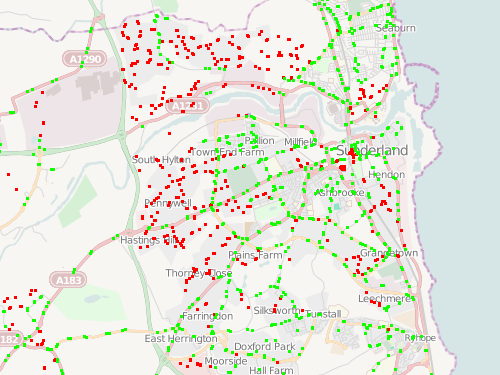
Looks like the Newcastle area is the No. 1 target area (within areas which have the government bus-stop dataset imported.)

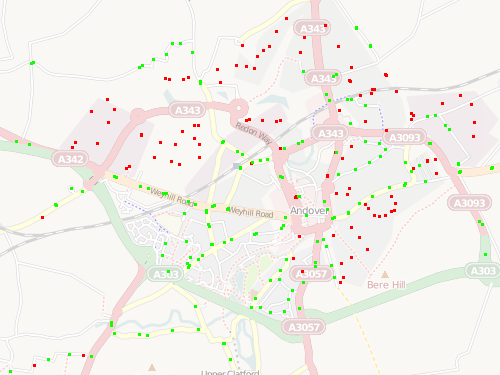
Andover has a mapping party planned for mid-May and is currently No. 39 on the list. If you are in the area, sign up!

Categories
OpenStreetMap Technical

Map Adornments with Cairo

For my OpenOrienteeringMap service, I have a added PDF creation facility, which produces a map, ready to print, with a title, north arrow, club logo and link back to the website.

The map itself is rendered in Mapnik, which uses Cairo, using Python and the pycairo bindings. To add the adornments, I’ve also made use of these bindings, and use them at the same time.

The adornments are shown above highlighted in yellow, and the purple control circles and numbers are also added directly using Cairo, rather than being rendered as geospatial objects in Mapnik. This blog post concentrates on the ones at the top of the sheet.

Here’s part of the Python script used to produce the PDF. S2P is a constant used to convert from metres (i.e. map units) to points (i.e. screen/paper units) and its value is 72/0.0254 (72 points per inch, 1/2.54 inches per cm).

I’ve generally use capitals for the names for the various positioning values, with a sort of naming convention – “W” is width, “WM” is west (i.e. left) margin. For example, ADORN_L_W is the width of the logo adornment, in metres. The “surface” sheet is made up of various “contexts” – in effect content boxes, which are positioned and scaled onto the surface, and filled with the content.

We need to import some modules:

import tempfile
import mapnik
import cairo
import urllib

Firstly, set up the PDF sheet, or “surface”, specifying its size:

file = tempfile.NamedTemporaryFile()
surface = cairo.PDFSurface(file.name, PAPER_W*S2P, PAPER_H*S2P)

It’s important to specify the sizes accurately so that printers will print without trying to reduce the PDF, so rendering the scale inaccurate. For example, A4 landscape needs to have a PAPER_W of exactly 0.2970 and PAPER_H of 0.2100.

Then set up the map element – note Mapnik requires integers for the widths and heights:

map = mapnik.Map(int(MAP_W*S2P), int(MAP_H*S2P))
mapnik.load_map(map, styleFile)
map.zoom_to_box(cbbox)

Create a context on the surface to draw the map onto, and shift it to allow for margins on the page.

ctx = cairo.Context(surface)
ctx.translate(MAP_WM*S2P, MAP_NM*S2P)
mapnik.render(map, ctx)

Then, just add each adornment in the right place. First the title – the text has been supplied in the URL so is decoded first:

text = urllib.unquote(title)

Then, write the title onto the surface using show_text. Obviously, the server needs to have the fonts installed – I was using Deja Vu Sans initially, but Arial is used for the “regular” Street-O maps that I’m mimicing, so I installed the Microsoft Truetype Core Fonts for Linux:

ctx = cairo.Context(surface)
ctx.select_font_face("Arial Black", cairo.FONT_SLANT_NORMAL, cairo.FONT_WEIGHT_NORMAL)
ctx.set_font_size(24)
ctx.translate(MAP_WM*S2P, (MAP_NM-ADORN_T_SM)*S2P)
ctx.show_text(text)

The image above – and the ones below – are shown at 150% of their actual size on screen.

Now to add a scale caption:

ctx = cairo.Context(surface)
ctx.select_font_face("Arial", cairo.FONT_SLANT_NORMAL, cairo.FONT_WEIGHT_NORMAL)
text = "Scale 1:" + str(scale)
ctx.set_font_size(14)
width = ctx.text_extents(text)[4]
ctx.translate((MAP_WM+MAP_W)*S2P-width-(ADORN_A_W+ADORN_L_W)*S2P, (MAP_NM-ADORN_S_SM)*S2P)
ctx.show_text(text)

..and below it, a scalebar and indicator:

ctx = cairo.Context(surface)
ctx.select_font_face("Arial", cairo.FONT_SLANT_NORMAL, cairo.FONT_WEIGHT_NORMAL)
scaleBarMetres = 500
if scale < 10000:
    scaleBarMetres = 200
text = str(scaleBarMetres) + "m"
ctx.set_font_size(7)
width = ctx.text_extents(text)[4]
barCaptionX = (MAP_WM+MAP_W-(ADORN_A_W+ADORN_L_W))*S2P-width
ctx.translate(barCaptionX, (MAP_NM-ADORN_S_SM)*S2P)
ctx.show_text(text)

..the scalebar itself, making use of stroke:

ctx.set_line_width(0.5)
scaleBarW = scaleBarMetres/float(scale)
ctx.move_to((-scaleBarW-ADORN_S_PADDING)*S2P, 0)
ctx.rel_line_to(0, -ADORN_S_LARGETICK*S2P)
ctx.rel_line_to(0, ADORN_S_LARGETICK*S2P)
ctx.rel_line_to(scaleBarW*S2P/2, 0)
ctx.rel_line_to(0, -ADORN_S_SMALLTICK*S2P)
ctx.rel_line_to(0, ADORN_S_SMALLTICK*S2P)
ctx.rel_line_to(scaleBarW*S2P/2, 0)
ctx.rel_line_to(0, -ADORN_S_LARGETICK*S2P)
ctx.stroke()

The north-arrow is done in a similar way. close_path is used to create a proper triangle, with no “ends” that might result in ugly capping effects. fill makes it solid.

ctx = cairo.Context(surface)
ctx.translate((MAP_WM+MAP_W-ADORN_L_W)*S2P-width, CONTENT_NM*S2P)
ctx.set_line_width(1)
ctx.move_to(0, 0)
ctx.line_to(0.001*S2P, 0.002*S2P)
ctx.line_to(-0.001*S2P, 0.002*S2P)
ctx.close_path()
ctx.fill()

The “N” below the arrow is also drawn with lines, but using round line joins and line caps to produce a smooth letter.

ctx.move_to(0, 0.001*S2P)
ctx.line_to(0, 0.008*S2P)
ctx.stroke()
ctx.set_line_join(cairo.LINE_JOIN_ROUND)
ctx.set_line_cap(cairo.LINE_CAP_ROUND)
ctx.move_to(-0.001*S2P, 0.005*S2P)
ctx.rel_line_to(0, -0.002*S2P)
ctx.rel_line_to(0.002*S2P, 0.002*S2P)
ctx.rel_line_to(0, -0.002*S2P)
ctx.stroke()

Finally, a logo is added. This is a bit trickier – the logo is a PNG, but the surface is a PDF. The way I got around this is to create a temporary ImageSurface and then switch the surface that the context is on – the graphic also gets appropriately scaled:

logoSf = cairo.ImageSurface.create_from_png(home+"/logo.png")
ctx = cairo.Context(surface)
width = logoSf.get_width()*ADORN_L_SCALE
ctx.translate((MAP_WM+MAP_W)*S2P-width, CONTENT_NM*S2P)
ctx.scale(ADORN_L_SCALE, ADORN_L_SCALE)
ctx.set_source_surface(logoSf , 0, 0)
ctx.paint()

Finally, putting it all together:

surface.finish()
return file

Categories
OpenStreetMap

On Lonely Buses and Orphaned Bus Stops

Contributors to OpenStreetMap in the UK have been gradually importing in the NaPTAN dataset of the locations of bus stops (amongst other things).

Many, but not all, of the local authority areas, have now had their bus stops imported in to the OpenStreetMap database in this way. These, and the other areas, also have bus stops shown that have been manually added by contributors based on ground observations.

In areas where the roads have not been added into OSM (and there are still plenty such areas, where there is no accurate aerial imagery to trace from, or contributors on the ground with GPS) the bus stops will appear disconnected from any road on the map. Large numbers of these “orphaned” bus stops in an area are indicative that key roads or even whole villages and towns are missing from the map.

To aid discovery of such roads and towns, I’ve created a simple visualisation. Bus stops appear as green dots if they are within around 20m of any highway (this does include cycle paths, paths and railways, but in general if these features are present, nearby roads would be too). Stops that are further away are shown as red dots.

The visualisation can be seen here. The mapnik stylesheet used is here (XML) – Mapnik 0.7.0+ is required because of the !bbox! usage, and the generic entity stylesheets used in OSM/Mapnik are also referenced.

The tiles are generated directly from my copy of the OpenStreetMap “planet” database, using Mapnik to call PostGIS with a spatial query. The process of calculating the bus stop statuses is reasonably CPU-intensive – for each bus stop, a buffer around the stop is created and then line-in-polygon tests are done on all roads in the area using a spatial index. PostGIS makes the process straightforward – ST_DWithin is used for the buffering, and ST_Intersects is used separately on the stops and highways to restrict the search to the local area.

To reduce the complexity of the query, the cut-off distance actually varies slightly – the coordinate reference system used is “metres” in EPSG 900913 – the so-called “Google” projection. The “metres” are only 1m long at the equator – away from it, they are shortened by a factor of cosine of the latitude, so for UK latitudes, 30 EPSG 900913 metres are equivalent to between 14 and 20m, decreasing as you travel north.

The results show some key towns in need of more roads, such as Cleethorpes, Kidderminster and Thetford, while much of the town-to-town network in SE England is pretty good. The process does assume the bus stop locations are correct, which is not necessarily the case, and also for very wide roads, the bus stops in real life may be further away than 20m from the road centreline, and so incorrectly shown on the visualisation.

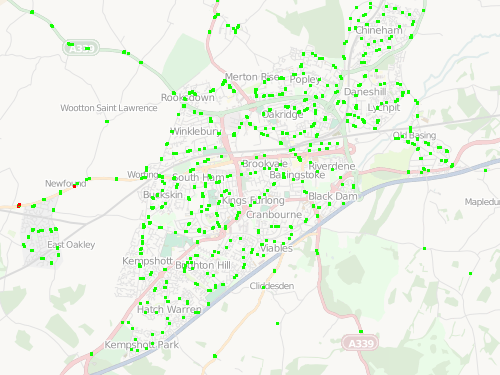
Basingstoke is looking pretty good:

But nearby Andover needs more mapping:

In places, the density and linearity of the orphaned bus-stops means that, in theory, a road could be added to OSM based solely on the pattern of stops in these places.

Try it out here [now offline].

Categories
Technical

A Google Streetview History

Inspired by Alex – all the places I’ve ever lived:

Google’s UK streetview coverage isn’t quite ubiquitous – a couple of the images are snapped looking across fields from the nearest main road, and one of the images is pointing in the correct direction, but the house is completely hidden by all the trees in that general area.

The New York one should be pretty easy to spot, as well as my move to London and its terraced housing. The last picture is of my parent’s new house – the Google camera seems to have fallen onto its side when driving down this particular steep and twisty road.

Categories
OpenStreetMap Orienteering

OOM Presentation

I gave a talk on OpenOrienteeringMap at an (un)conference today – the slides are on my research blog.

Categories
Conferences OpenStreetMap

Wherecamp EU – Day 2

Today was the second day of Wherecamp EU, at the very swish Guardian offices in King’s Cross. More interesting talks, I mainly went to the OSM-themed ones this time, although I also spent a very interesting hour watching a simple iPhone map application being created from scratch. RichardF’s Potlatch 2 intro talk was probably my favourite of the day.

I also finally got around to giving my talk, a short description of orienteering and OpenOrienteeringMap. Highlight for me today though, perhaps because I did a 5K race this morning and then arrived at the conference too late for breakfast, was the excellent lunch, street-food wraps from Moolis – yum! Sponsors and unconferences rule.

OpenOrienteeringMap

View more presentations from oliverobrien.
Categories
Conferences

Wherecamp EU – Day 1

The first day of Wherecamp EU – a geo “unconference” – was today in London. Not having been to an unconference before, I wasn’t sure what was going to happen, but actually everything went pretty smoothly thanks to the efforts of the organisers. After a introduction session, talks (some lecture-style, some brainstorms/Q&As) were in six parallel streams, in strictly half-hour slots. People were given post-it notes and encouraged to stick on the “unconference wall” a topic that they would then talk about at the corresponding place and time:

The wall for today pretty much got filled, and there’s 15 up already for the final day, tomorrow, which is in the Guardian’s offices.

I generally enjoyed the talks I picked – particularly a talk by the ESRI UK CTO on the need to rethink how metadata in GIS is managed, especially in relation to delivering it through to mashups, to increase confidence in the final presented data. My favourite though was, without a doubt, a look at the ITO visualisations of OpenStreetMap and UK public transport datasets. The datasets are interesting on their own, but the polish on the visualisations are outstanding. For example, streams of sci-fi-style pulses representing the 24-hour flow of the UK long-distance coach network.

Tonight is “geo-beers” in King’s Cross, paid for by a sponsor – the entire conference is free, with free food and drink, thanks to the many sponsors of the event. Very impressed so far. Even the wifi held up. Possibly the only thing missing is a Twitter wall. Look forward to tomorrow’s sessions.

Categories
Orienteering

OOM Undocumented Feature – Rotating Control Labels

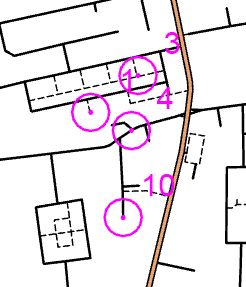
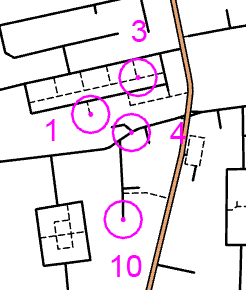
One problem which my club has come across when assembling Street-O maps using OpenOrienteeringMap is where control labels clash with other features on the map – they may obscure important underlying topology, or intrude on the circles denoting other nearby controls, as shown in the first image below.

To fix this, you can manually specify the angle that the label appears at with respect to the control circle. I haven’t yet built this in to the online map builder, partly because I didn’t want to clutter the UI with too many options, partly because I haven’t got around to it, and partly because the variables that allow labels to be positioned as such is not yet in the released version of OpenLayers (it is in the trunk) that the map builder is based on, so I’ve had to patch my version specially – I’m reluctant to do too much coding in this area before it’s formally released.

…anyway, to fix it, first produce your map as normal. Then, notice the faint horizontal black line on the bottom left of the PDF? This is actually text which represents a partial URL that allows the map to be recreated. Zoom in to the bottom left in your PDF reader, and copy the line of text into a text editor.

The next step is to edit the label angles. Find the section starting “controls=“. Everything beyond this is a control, each control is defined as four numbers, each seperated by a comma (and no spaces). A comma is also used to separate each control. e.g. controls=1a,1b,1c,1d,2a,2b,2c,2d – where 1a, 1b, 1c and 1d are the four attributes for control 1, etc. The attributes are control number, label angle (clockwise from north), latitude and longitude. The lat/lon coordinates look funny – they use the “EPSG900913” Google-style coordinates. The label angle is the one to change – they all default to 45 (top right), changing this to, for example, 180, will set the label to be directly below the circle.

Once this is done, copy the long line of text and append it to the URL http://casa.oobrien.com/maptiler/pdf? in your web browser. Make sure there’s no comma at the end. Press enter and you should get back a new PDF with the corrected angles, as seen in the second image below. (N.B. the URL may change in the future, I’m piggy-backing off one of my work project websites at the moment for this.)


Before


After