Categories
Technical

Quick-and-Dirty WordPress Site Cloning

mysqlcloning

Here is a guide to clone a WordPress(.org) blog, on the same server, 10 steps, on Linux, You’ll definitely need admin access to the blog itself, and probably to the database and server too, depending on your setup. I did this recently as I needed a copy of an existing production site, to hack on. If you don’t fancy doing it the quick-and-dirty way, there are, I’m sure, even quicker (and cleaner) ways, by installing plugins.

In the following instructions, substitute X and Y for your existing and new blog, respectively.

0. Do a backup of your current website, like you do normally for an upgrade or archiving, in case anything goes wrong. e.g. under Tools > Export in the WordPress admin interface.

1. Copy all the files:
cp -r /home/~username/www/blog_X /home/~username/www/blog_Y

2. Edit wp-config.php in your new blog directory:

Change:
$table_prefix = 'wp_X_';
to:
$table_prefix = 'wp_Y_';

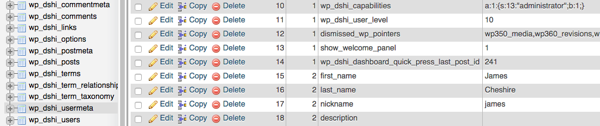
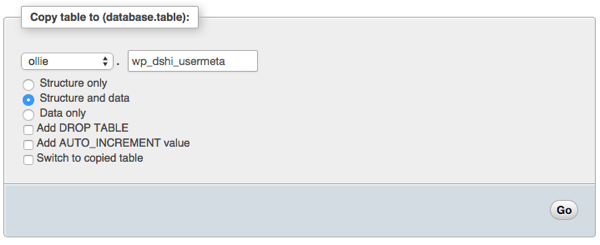
3. Copy all the database tables (prefixed with wp_X_). The new ones should have a prefix wp_Y_ instead. I used the Copy functionality under the Operations tab in phpMyAdmin (see screenshot below).

4. Edit wp_Y_options:
update wp_Y_options set option_name = 'wp_Y_user_role' where option_name = ' wp_X_user_role';

5. Edit wp_Y_options:
Edit the option_value for rows with option_name values of siteurl and home, pointing them to the new location – mine are the same but one might be different, e.g. if you have your WordPress core files in a subdirectory relative to the directory for the site entry-point on the web.

update wp_Y_options set option_value = 'http://your_server.com/~username/wp_Y' where option_name = 'siteurl';
update wp_Y_options set option_value = 'http://your_server.com/~username/wp_Y' where option_name = 'home';

There may be other rows referencing your old blog name, but these are probably from plugins and therefore probably don’t need to be changed.

6. Edit wp_Y_usermeta:
update wp_Y_usermeta set meta_key = replace(meta_key, 'wp_X', 'wp_Y');

(You can edit the affected rows manually, but I had a lot to do – there’s around 5 for each user.)

7. Drop force-upgrade.php in the same directory as wp-config.php and run it from your browser. This rebuilds caches/hashes stored in some of the tables. You can run it repeatedly if necessary, (e.g. if you missed a step above), it shouldn’t do any harm.

You can find force-upgrade.php here.

8. Delete force-upgrade.php. Leaving it is a security risk.

9. Log in to your blog in the new location, as normal. Usernames and passwords should be preserved.

mysqlcopy

Categories
Data Graphics

Bad Maps

<rant> Three maps with glaring errors which I came across yesterday. I’m hesitant to criticise – many of my own maps have, I am sure, issues too (i.e. my Electric Tube map, on the right, is deliberately way off.) But I couldn’t resist calling out this trio which I spotted within a few hours of each other.

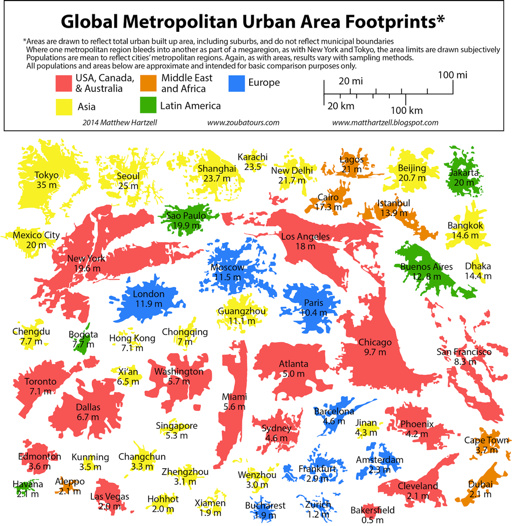
1. Global Metropolitan Urban Area Footprints

footprints

This is, in itself, a great concept. I particularly like that the creator has used the urban extent rather that administrative boundaries, which rarely follow the true urban extent of a city. The glaring error is scale. It looks like the creator traced the boundaries of each city’s urban extent in Google Maps (aerial view) or similar. All well and good, but a quirk of representing a 3D globe on a 2D “slippy” map means that the scale in Google Maps (and OpenStreetMap and other maps projected to “WebMercator”) varies with latitude, at a fixed zoom level. This hasn’t been accounted for in the graphic, with the result that all cities near the equator (i.e. most of the Asian and African ones) are shown on the map smaller relative to the others, while cities near the poles (e.g. London, Paris, Edmonton, Toronto) are shown misleadingly big. This is a problem because the whole point of the graphic is to compare footprints (and populations) of the major cities. In fact, many of those Chinese and African cities are quite a bit bigger relative to, for example, London, than the graphic suggests.

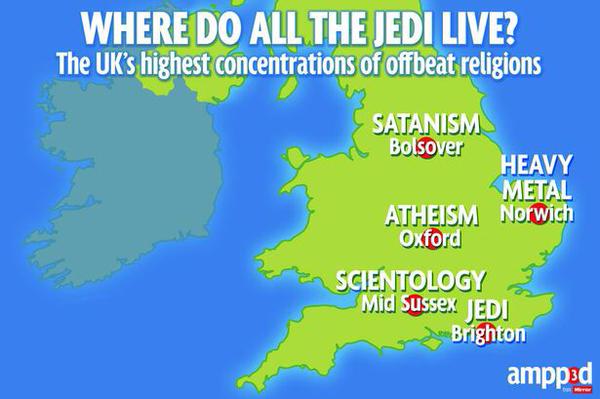
2. Where Do All The Jedi Live?

religions

The map is in the Daily Mirror (and their online new media) so it doesn’t need to be a pinnacle of cartographic excellence – just a device to get a story across.However, Oxford and Mid Sussex – 40% of the datapoints – are shown in the wrong place – both are much closer to London than the map suggests. The author suggests they did this to make the text fit – but there better ways to accommodate text while having the centroid dots in the correct location. It might take a little longer but then it wouldn’t be – quite simply – wrong. I’m somewhat disappointed that the Mirror not only stoops to the level of Fox News in the accuracy of their mapping, but appears to have no problem with maintaining such an error, even when readers point it out. It’s sloppy journalism and a snub to the cartographic trade, that just relocating whole cities for artistic purposes is not an issue, particularly as so many people in the UK have relatively poor spatial literacy and so can be potentially easily manipulated.

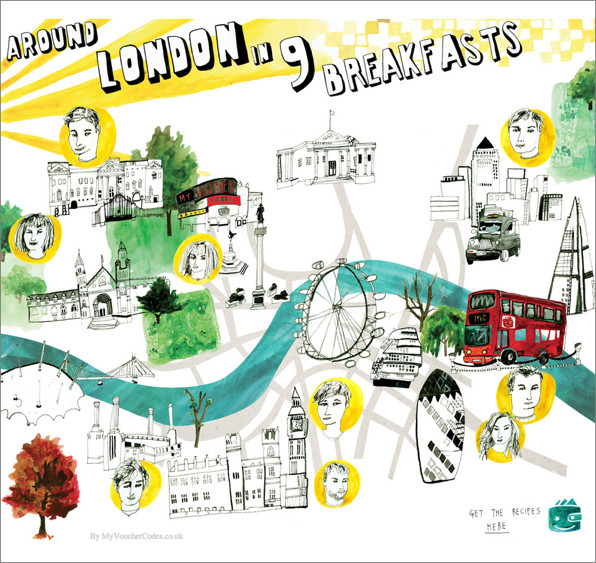
3. A London map…

breakfasts

I’m not really sure where to begin here. I’m not sure if any of the features are in fact in the right place!

Categories
Technical

OpenLayers 3 and Vector Data

As part of a project to move most of my OpenLayers 2-powered websites to OpenLayers 3, I have recently converted two more – DataShine: Travel to Work Flows and the North/South Interactive Map. Unlike the main DataShine: Census website, both of these newer conversions include vector geospatial data, so there was additional learning involved during the migration process, mainly relating to vector styling.

northsouth2North/South Interactive Map

For the North/South Interactive Map, I made use of the loading in of remote GeoJSON files.

Vector Layers

Here’s a vector layer:

layerPoints = new ol.layer.Vector({
    source: pointSource,
    style: function(feature, res) { return pointStyle(feature, res); }
});

The pointSource is a ol.source.GeoJSON, which requires the projection of the files to be defined, as well as that to be displayed, when defining the source for the Vector layer:
pointSource = new ol.source.GeoJSON({
    url: '...',
    defaultProjection: 'EPSG:4326',
    projection: 'EPSG:3857',

    attributions: [ new ol.Attribution({ 'html': "..." }) ]
});

If you wish to do further operations on your data once it is loaded in, you need to add a listener to a remotely loaded (e.g. GeoJSON file) source included within a Vector layer:

pointSource.once('change', function()
{
    if (pointSource.getState() == 'ready')
    { var features = pointSource.getFeatures(); ... }
};

Here’s a typical style function. I’m using a property “highlight” on my feature to style such features differently:

function pointStyle(feature, resolution)
{
    return [
        new ol.style.Style({
            image: new ol.style.Circle({
                radius: (feature.highlight ? 7 : feature.radius ),
                fill: new ol.style.Fill({ color: feature.fillColor }),
                stroke: new ol.style.Stroke({ width: feature.strokeWidth, color: '#fff' })
            }),
            text: new ol.style.Text({
                text: (feature.highlight ? feature.label : ""),
                font: '9px Ubuntu, Gill Sans, Helvetica, Arial, sans-serif',
                fill: new ol.style.Fill({ color: '#fff' })
            })
        })
    ]
};

Interactions

To detect clicks, I used an ol.interaction.Select – N.B. if you don’t specify which layers it applies to, it tries to apply them to all Vector layers!

var selectClick = new ol.interaction.Select({
    condition: ol.events.condition.click,
    style: function(feature, res) { return pointStyle(feature, res); },
    layers: [layerPoints]
});

selectClick.getFeatures().on('change:length', function(e)
{ ... }

olMap.addInteraction(selectClick);

In my function here I remove the flag from any already highlighted features and call features[i].changed(); to get the non-highlighed style. You don’t need to call this on what you’ve actually clicked on, as this is done implicitly. here’s likely better ways of showing selected/highlighted features, using ol.FeatureOverlay, but i couldn’t get this to work.

coordinates

MousePosition

There’s quite a nice new utility function which means it was little effort to get an “old style” location indicator in, at the bottom of the North/South interactive:
new ol.control.MousePosition({ projection: "EPSG:4326", coordinateFormat: ol.coordinate.toStringHDMS, className: 'olControlMousePosition' })

ttwf

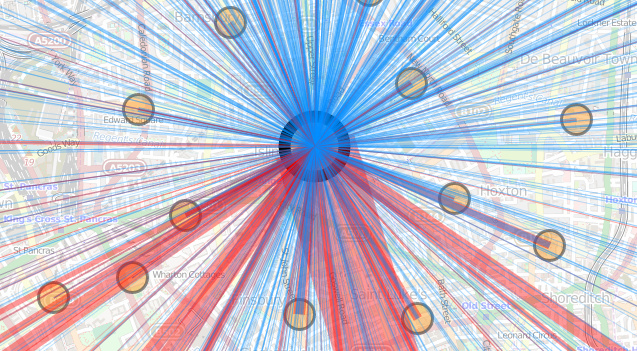
DataShine: Travel to Work Flows

This loads vector data in as generic JSON through a regular (non-OL) AJAX call rather than GeoJSON so the processing is a bit more manual. This time, my source for the Vector layer is a simple ol.source.Vector which can be emptied with source.clear(); and reused.

I’m creating lines directly from the JSON, converting from OSGB grid and specifying colour (for the style) as I go – note my use of rgba format, allowing me to specify a partial transparency (of 60%) for the lines:

var startLL = ol.proj.transform([data[start][2], data[start][3]], "EPSG:27700", "EPSG:3857");
var endLL = ol.proj.transform([data[end][2], data[end][3]], "EPSG:27700", "EPSG:3857");
var journeyLine = new ol.geom.LineString([startLL, endLL]);
var lineItem = new ol.Feature({ geometry: journeyLine });
lineItem.strokeColor = 'rgba(255, 0, 0, 0.4)'; lineSource.addFeature(lineItem);

As previously blogged, I’m also using hand-crafted permalinks in both websites, and drag-and-drop KML display and UTF grid mouseovers in the latter, and both have also had their stylesheets tweaked to allow for easy printing – again made possible with OL3.

I’m about ready now to tackle my most complicated OpenLayers project by far, the Bike Share Map.

Categories
BODMAS OpenLayers Technical

OpenLayers 3 and DataShine

ds_ol3

OpenLayers is a powerful web mapping API that many of my websites use to display full-page “slippy” maps. DataShine: Census has been upgraded to use OpenLayers 3. Previously it was powered by OpenLayers 2, so it doesn’t sound like a major change, but OL3 is a major rewrite and as such it was quite an effort to migrate to it. I’ve run into issues with OL3 before, many of which have since been resolved by the library authors or myself. I was a bit grumbly in that earlier blogpost for which I apologise! Now that I have fought through, the clouds have lifted.

Here are some notes on the upgrade including details on a couple of major new features afforded by the update.

New Features

Drag-and-drop shapes

One of the nicest new features of OL3 is drag-and-dropping of KMLs, GeoJSONs and other geo-data files onto the map (simple example). This adds the features pans and zooms the map to the appropriate area. This is likely most useful for showing political/administrative boundaries, allowing for easier visual comparisons. For example, download and drag this file onto DataShine to see the GLA boundary appear. New buttons at the bottom allow for removal or opacity variation of the overlay files. If the added features include a “name” tag this appears on the key on the left, as you “mouse over” them. I modified the simple example to keep track of files added in this way, in an ol.layer.Group, initially empty when added to the map during initialisation.

Nice printing

Another key feature of OL3 that I was keen to make use of is much better looking printing of the map. With the updated library, this required only a few tweaks to CSS. Choosing the “background colours” option when printing is recommended. Printing also hides a couple of the panels you see on the website.

Nice zooming

OL3 also has much smoother zooming, and nicer looking controls. Try moving the slider on the bottom right up and down, to see the smooth zooming effect. The scale control also changes smoothly. Finally, data attributes and credits are now contained in an expandable control on the bottom left.

A bonus update, unrelated to OL3, is that I’ve recreated the placename labels with the same font as the DataShine UI, Cabin Condensed. The previous font I was using was a bit ugly.

Major reworkings to move from OL2 to OL3

UTF Grids

With OpenLayers 3.1, that was released in December 2014, a major missing feature was added back in – support for UTF Grid tiles of metadata. I use this to display the census information about the current area as you “mouse over” it. The new implementation wasn’t quite the same as the old though and I’ve had to do a few tricks to get it working. First of all, the ol.source.TileUTFGrid that your UTF ol.layer.Tile uses expects a TileJSON file. This was a new format that I hadn’t come across before. It also, as far as I can tell, insists on requesting the file with a JSONP callback. The TileJSON file then contains another URL to the UTF Grid file, which OL3 also calls requiring a JSONP callback. I implemented both of these with PHP files that return the appropriate data (with appropriate filetype and compression headers), programmatically building “files” based on various parameters I’m sending though. The display procedure is also a little different, with a new ol.source.TileUTFGrid.forDataAtCoordinateAndResolution function needing to be utilised.

In my map initialisation function:

layerUTFData = new ol.layer.Tile({});

var handleUTFData = function(coordinate)
{
  var viewResolution = olMap.getView().getResolution();
  layerUTFData.getSource().forDataAtCoordinateAndResolution(coordinate, viewResolution, showUTFData);
}

$(olMap.getViewport()).on('mousemove', function(evt) {
  var coordinate = olMap.getEventCoordinate(evt.originalEvent);
  handleUTFData(coordinate);
});

In my layer change function:

layerUTFData.setSource(new ol.source.TileUTFGrid({
  url: "http://datashine.org.uk/utf_tilejsonwrapper.php?json_name=" + jsonName
})

(where jsonName is how I’ve encoded the current census data being shown.)

Elsewhere:

var callback = function(data) { [show the data in the UI] }

In utf_tilejsonwrapper.php:

<?php
header('Content-Type: application/json');
$callback = $_GET['callback'];
$json_name = $_GET['json_name'];
echo $callback . "(";
echo "
{ 'grids' : ['http://datashine.org.uk/utf_tilefilewrapper.php?x={x}&y={y}&z={z}&json_name=$json_name'],
'tilejson' : '2.1.0', 'scheme' : 'xyz', 'tiles' : [''], 'version' : '1.0.0' }";
echo ')';
?>

(tilejson and tiles are the two mandatory parts of a TileJSON file.)

In utf_tilefilewrapper.php:

<?php
header('Content-Type: application/json');
$callback = $_GET['callback'];
$z = $_GET['z'];
$y = $_GET['y'];
$x = $_GET['x'];
$json_name = $_GET['json_name'];
echo $callback . "(";
echo file_get_contents("http://[URL to my UTF files or creator service]/$json_name/$z/$x/$y.json");
echo ')';
?>

Permalinks

The other change that required careful coding to recreate the functionality of OL2, was permalinks. The OL3 developers have stated that they consider permalinks to be the responsibility of the the application (e.g. DataShine) rather than the mapping API, and, to a large extent, I agree. However OL2 created permalinks in a particular way and it would be useful to include OL3 ones in the same format, so that external custom links to DataShine continue to work correctly. To do this, I had to mimic the old “layers”, “zoom”, “lat” and “lon” parameters that OL2’s permalink updated, and again work in my custom “table”, “col” and “ramp” ones.

Various listeners for events need to be added, and functions appended, for when the URL needs to be updated. Note that the “zoom ended” event has changed its name/location – unlike moveend (end of a pan) which sits on your ol.map, the old “zoomend” is now called change:resolution and sets on olMap.getView(). Incidentally, the appropriate mouseover event is in an OL3-created HTML element now – olMap.getViewport() – and is mousemove.

Using the permalink parameters (args):

if (args['layers']) {
  var layers = args['layers'];
  if (layers.substring(1, 2) == "F") {
    layerBuildMask.setVisible(false);
  }
  [etc...]
}
[& similarly for the other args]

On map initialisation:

args = []; //Created this global variable elsewhere.
var hash = window.location.hash;
if (hash.length > 0) {
  var elements = hash.split('&');
  elements[0] = elements[0].substring(1); /* Remove the # */
  for(var i = 0; i < elements.length; i++) {     var pair = elements[i].split('=');     args[pair[0]] = pair[1];   } }

Whenever something happens that means the URL needs an update, call a function that includes this:

var layerString = "B"; //My old "base layer"
layerBuildMask.getVisible() ? layerString += "T" : layerString += "F";
[etc...]
layerString += "T"; //The UTF data layer.
[...]
var centre = ol.proj.transform(olMap.getView().getCenter(), "EPSG:3857", "EPSG:4326");
window.location.hash = "table=" + tableval + "&col=" + colval + "&ramp=" + colourRamp + "&layers=" + layerString + "&zoom=" + olMap.getView().getZoom() + "&lon=" + centre[0].toFixed(4) + "&lat=" + centre[1].toFixed(4);
}

Issues Remaining

There remains a big performance drop-off in panning when using DataShine on mobile phones and other small-screen devices. I have put in a workaround "viewport" meta-tag in the HTML which halves the UI size, and this makes panning work on an iPhone 4/4S, viewed horizontally, but as soon as the display is a bit bigger (e.g. iPhone 5 viewed horizontally) performance drops off a cliff. It's not a gradual thing, but a sudden decrease in update-speed as you pan around, from a few per second, to one every few seconds.

Additional Notes

Openlayers 3 is compatible with Proj4js version 2 only. Using this newer version requires a slightly different syntax when adding special projections. I use Proj4js to handle the Ordnance Survey GB projection (aka ESPG:27700), which is used for the postcode search, as I use a file derived from the Ordnance Survey's Code-Point Open product.

I had no problems with my existing JQuery/JQueryUI-based code, which powers much of the non-map part of the website, when doing the upgrade.

Remember to link in the new ol.css stylesheet, or controls will not display correctly. This was not needed for OL2.

OL3 is getting there. The biggest issue remains the sparsity of documentation available online - so I hope the above notes are helpful in the interim.

ds_ol3overlay2

Above: GeoJSON-format datafiles for tube lines and stations (both in blue), added onto a DataShine map of commuters (% by tube) in south London.
Categories
OpenStreetMap Orienteering

OOM 2.3 – Automatic Postbox Additions

postboxes

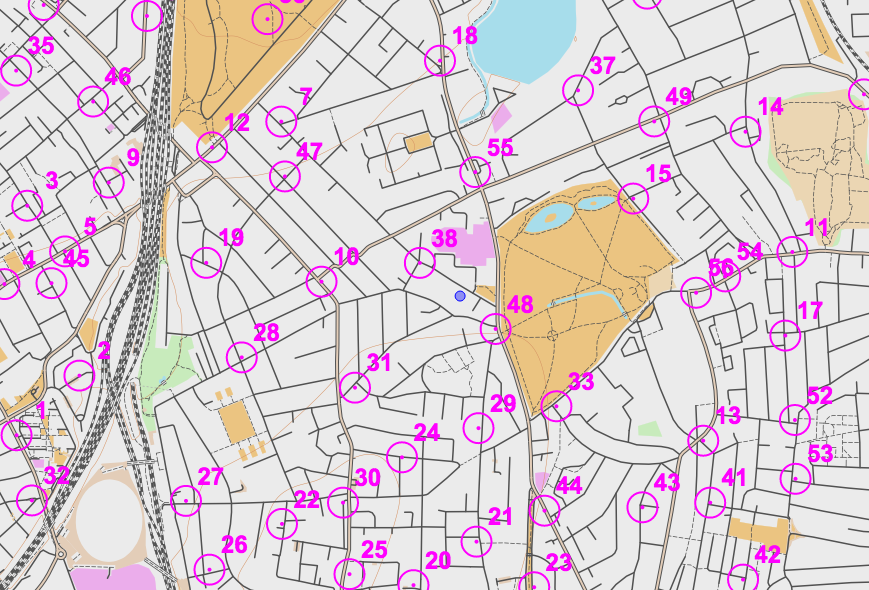
As a fun project for OpenOrienteeringMap (OOM) during the Christmas pause, I incorporated a feature requested on the forums of NopeSport that I had actually also been thinking about myself – the automated addition of controls. I’m using Nearest Postbox which is a tool written by the polycoder Matthew Somerville to show postboxes in OpenStreetMap augment with reference numbers and other data. If you zoom into an area on the UK edition of OOM and click to add a map “sheet”, you can then click on the “Add Postboxes” button. OOM will make use of Matthew’s API to his site, to pull in known postbox locations and create controls from them. You’ll only be able to do this if there are not any controls already added. You can then edit/delete the controls (e.g. change the score) in the normal way.

postboxes_button

Some Street-O events by SLOW and other clubs already use postboxes as useful controls. This will hopefully make it more easy for the planner, although they’ll still need to visit the postboxes concerned to verify the ref and make sure the postbox is still there…

The feature is experimental, so if you run into any bugs please tell me.